728x90
Exception
Description:
Failed to configure a DataSource: 'url' attribute is not specified and no embedded datasource could be configured.
Reason: Failed to determine a suitable driver class
해결
application.yml에 데이터베이스 연결 설정을 확인하자.
예시는 아래와 같다.
mysql에 연결하기위해 connector dependency가 필요하다.
runtimeOnly 'com.mysql:mysql-connector-j'해당 의존성으로 driver-class-name: com.mysql.cj.jdbc.Driver 를 설정해 줄 수 있다.
spring:
  application:
    name:
  jpa:
    hibernate:
      ddl-auto: create
    show-sql: true
    defer-datasource-initialization: true
  datasource:
    driver-class-name: com.mysql.cj.jdbc.Driver
    url: jdbc:mysql://localhost:{}/{}?characterEncoding=UTF-8&serverTimezone=Asia/Seoul
    username: {}
    password: {}
설정을 했지만 안된다면 정말 데이터 베이스가 잘 연결되는지 확인해보자.
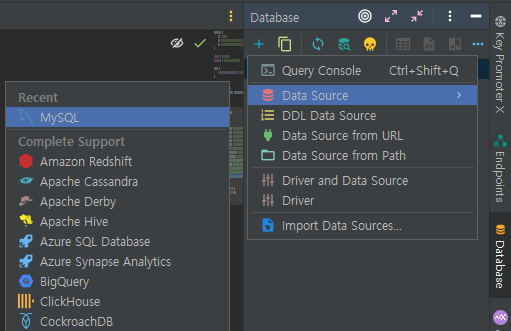
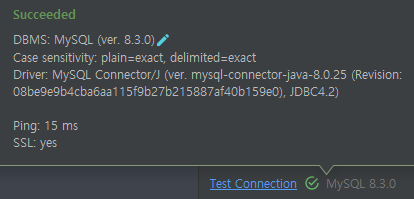
intellij의 오른쪽에 Database창을 열어 +를 눌러 사용하고자하는 Data Source를 클릭하여 위에 yml파일에 적은 설정을 그대로 사용해서 test connection했을 때 연결이 잘 되는지 확인해보자.

728x90
'spring > spring' 카테고리의 다른 글
| [Spring][스프링 부트 핵심 가이드] 액추에이터 활용하기 (0) | 2024.03.06 |
|---|---|
| [Spring][스프링 부트 핵심 가이드] 서버 간 통신 (0) | 2024.03.05 |
| [Spring][스프링 부트 핵심 가이드] 예외처리 (0) | 2024.02.28 |
| [Spring][스프링부트핵심가이드] 유효성 검사(Validation) (0) | 2024.02.26 |
| [Spring][Error][Kotlin][jpa] required a bean of type ... that could not be found. (0) | 2024.02.12 |